

Netty
Netty的介绍
1、 Netty是由jboss提供的一个Java开源框架,现在Github上的独立项目;
2、 Netty是一个异步的、基于事件驱动的网络应用框架,用以快速开发高性能、高可靠性的网络IO程序;
3、 Netty主要针对在TCP协议下,面向clients端的高并发应用,或者Peer-to-Peer场景下的大量数据持续传输的应用;
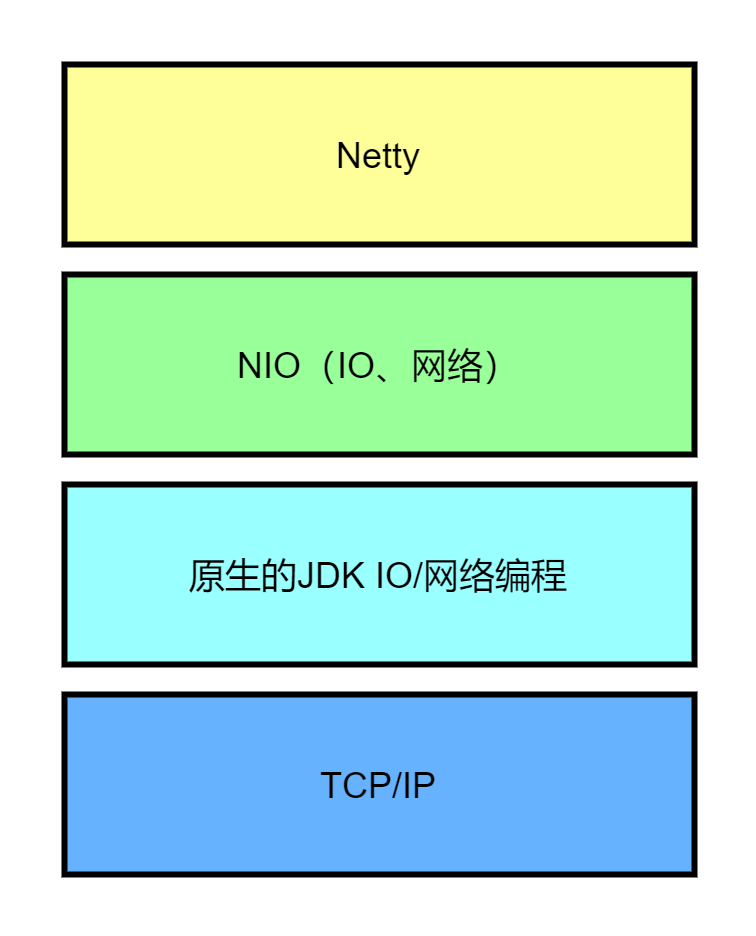
Netty的应用场景
互联网行业
1、 互联网行业:在分布式系统中,各个节点之间需要远程服务调用,高性能的RPC框架必不可少,Netty作为异步高性能的通信框架,往往作为基础通信组件被这些RPC框架使用;
2、 典型的应用有:阿里分布式服务框架Dubbo的RPC框架使用Dubbo协议进行节点间的通信,Dubbo协议默认使用Netty作为基础通信组件,用于实现各进程节点之间的内部通信;
游戏行业
1、 无论是手游服务端还是大型的网络游戏,Java语言得到了越来越广泛的应用;
2、 Netty作为高性能的基础通信组件,提供了TCP/UDP和HTTP协议栈,方便定制和开发私有协议栈,账号登录服务器;
3、 地图服务器之间可以方便的通过Netty进行高性能的通信;
大数据领域
1、 经典的Hadoop的高性能通信和序列化组件(AVRO实现数据文件共享)的RPC框架,默认采用Netty进行跨节点通信;
2、 它的NettyService基于Netty框架二次封装实现;
I/O模型
1、 I/O模型简单的理解:就是用什么样的通道进行数据的发送和接收,很大程度上决定了程序通信的性能;
2、 Java共支持3种网络编程模型I/O模式:BIO、NIO、AIO;
JavaBIO
同步并阻塞(传统阻塞型),服务器实现模式为一个连接一个线程,即客户端有连接请求时服务器端就需要启动一个线程进行处理,如果这个连接不做任何事情会造成不必要的线程开销;
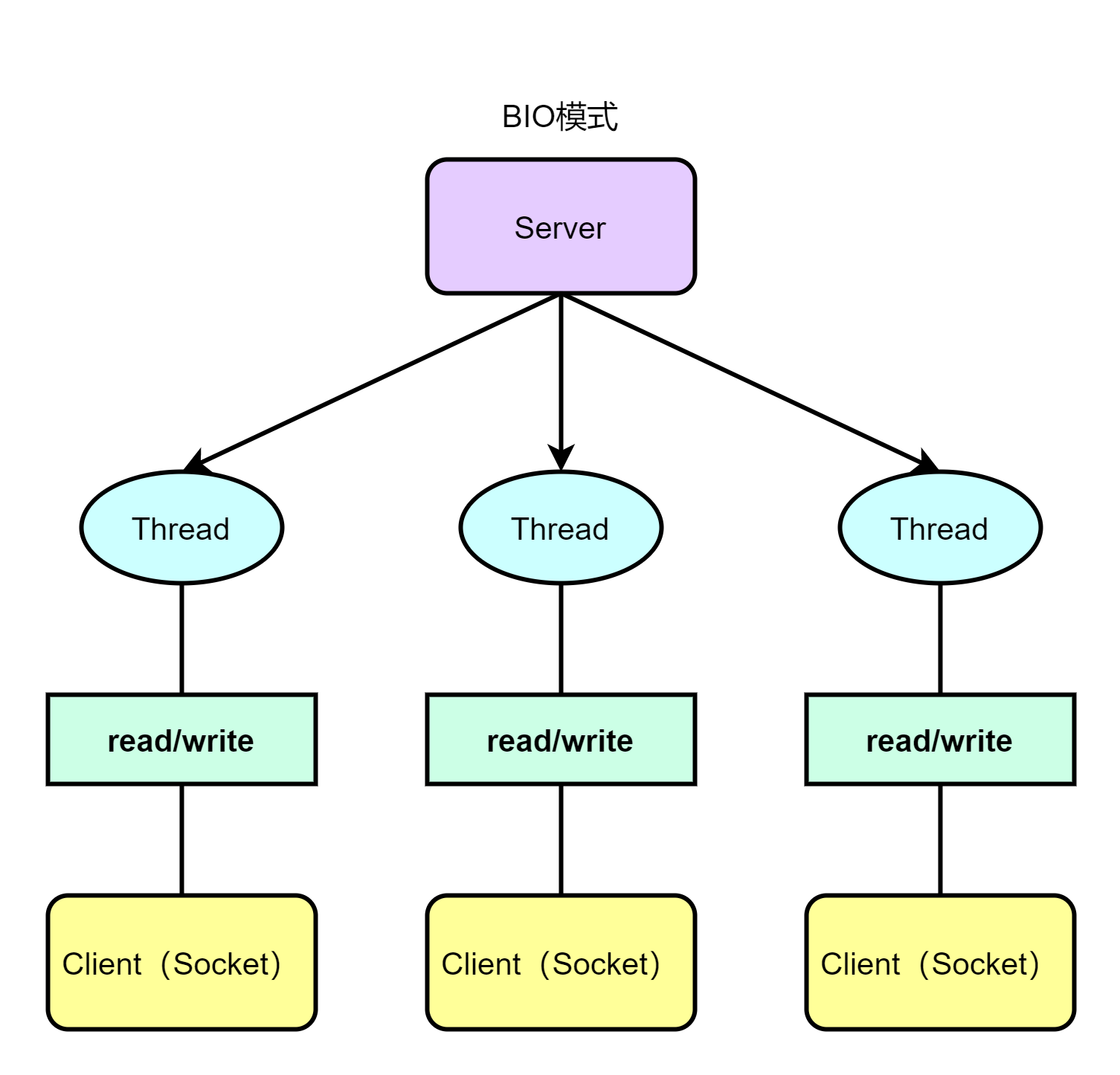
BIO介绍
1、 JavaBIO就是传统的JavaIO编程,其相关的类和接口在java.io;
2、 BIO(blockingI/O):同步阻塞,服务器实现模式为一个连接一个线程,即客户端有连接请求时服务器端就需要启动一个线程进行处理,如果这个连接不做任何事情会造成不必要的线程开销,可以通过线程池机制改善;
3、 BIO方式适用于连接数目比较小且固定的架构,这种方式对服务器资源要求比较高,并发局限于应用中,JDK1.4以前的唯一选择,但程序简单易理解;
public class BIOServer { public static void main(String[] args) throws IOException { // 线程池机制 //思路 //1.创建一个线程池 //2.如果有客户端连接,就创建一个线程,与之通讯 ExecutorService threadPool = Executors.newCachedThreadPool(); // 创建ServerSocket ServerSocket serverSocket = new ServerSocket(6666); System.out.println("服务器启动了"); while (true) { // 监听,等待客户端连接 System.out.println("等待连接......"); final Socket socket = serverSocket.accept(); System.out.println("连接到一个客户端"); // 就创建一个线程,与之通信 threadPool.execute(new Runnable() { @Override public void run() { //可以和客户端通讯 handler(socket); } }); } }
//编写一个handler方法,和客户端通信 public static void handler(Socket socket) { try { System.out.println("线程信息 id=" + Thread.currentThread().getId() + ", 名字:" + Thread.currentThread().getName()); byte[] bytes = new byte[1024]; // 通过socket 获取输入流 InputStream inputStream = socket.getInputStream(); // 循环读取客户端发送的数据 while (true) { System.out.println("线程信息 id=" + Thread.currentThread().getId() + ", 名字:" + Thread.currentThread().getName()); System.out.println("read.........."); int read = inputStream.read(bytes); if (read != -1) { System.out.println(new String(bytes, 0, read, "utf-8")); } else { break; } } } catch (IOException e) { e.printStackTrace(); } finally { try { System.out.println("关闭和client连接"); socket.close(); } catch (IOException e) { e.printStackTrace(); } } }}
BIO 问题分析
1、 每个请求都需要创建独立的线程,与对应的客户端进行数据Read,业务处理,数据Write;
2、 当并发数较大时,需要创建大量线程来处理连接,系统资源占用较大;
3、 连接建立后,如果当前线程暂时没有数据可读,则线程就阻塞在Read操作上,造成线程资源浪费;
JavaNIO
同步非阻塞,服务器实现模式为一个线程处理多个请求(连接),即客户端发送的连接请求都会注册到多路复用器上,多路复用器轮询到连接有I/O请求就进行处理;
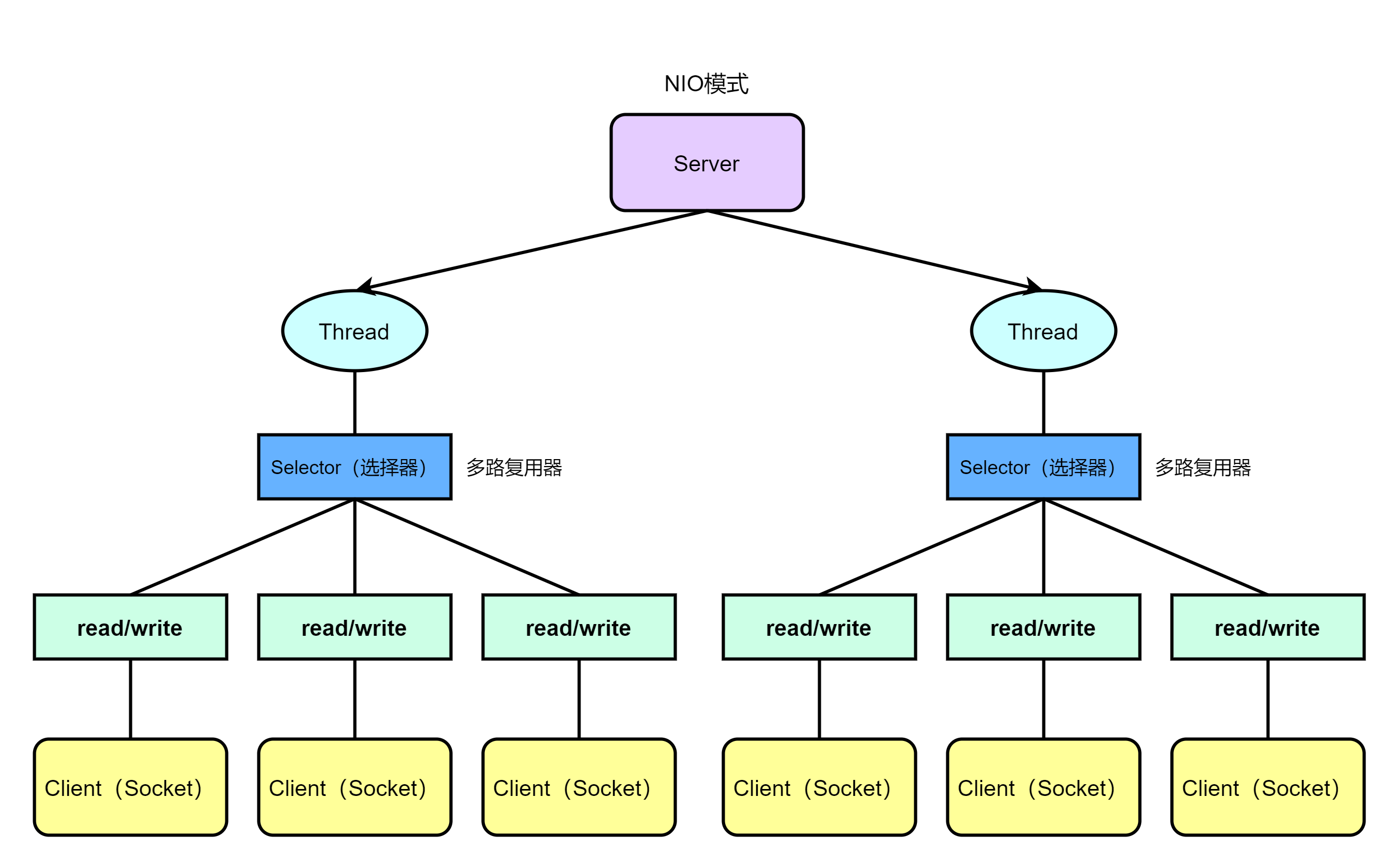
NIO基本介绍
1、 NIO全称non-blockingIO,是指JDK提供的新API从JDK1.4开始,Java提供了一系列改进的输入/输出的新特性,被统称为NIO(即NewIO),是同步非阻塞的
2、 NIO相关类都被放在java.nio包及子包下,并且对原java.io包中的很多类进行改写
3、 NIO有三大核心部分:Channel(通道),Buffer(缓冲区),Selector(选择器)
Buffer(缓冲区)
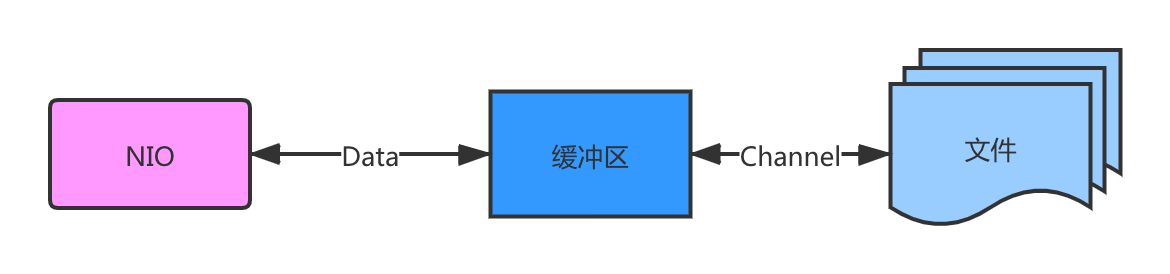
缓冲区(Buffer):缓冲区本质上是一个可以读写数据的内存块,可以理解成是一个容器对象(含数组),该对象提供了一组方法,可以更轻松地使用内存块,缓冲区对象内置了一些机制,能够跟踪和记录缓冲区的状态变化情况。Channel 提供从文件、网络读取数据的渠道,但是读取或写入的数据都必须经由 Buffer

public class BasicBuffer { public static void main(String[] args) { // 举例说明buffer的使用(简单说明) // 创建一个Buffer, 大小为5,即可以存放5个int IntBuffer intBuffer = IntBuffer.allocate(5); // 向buffer中存放数据 for (int i = 0; i < intBuffer.capacity(); i++) { intBuffer.put(i * 2); } // 如何从buffer读取数据 // 将buffer转换,读写切换 intBuffer.flip(); while (intBuffer.hasRemaining()){ System.out.println(intBuffer.get()); } }}
//输出02468Channel(通道)
NIO 的通道类似于流,但有些区别如下
-
通道可以同时进行读写,而流只能读或者只能写
-
通道可以实现异步读写数据
-
通道可以从缓冲读数据,也可以写数据到缓冲:
BIO 中的 Stream 是单向的,例如 FileInputStream 对象只能进行读取数据的操作,而 NIO 中的通道(Channel)是双向的,可以读操作,也可以写操作。
Channel 在 NIO 中是一个接口 public interface Channel extends Closeable{}
常用的 Channel 类有: FileChannel、DatagramChannel、ServerSocketChannel 和 SocketChannel 。【ServerSocketChanne 类似 ServerSocket、SocketChannel 类似 Socket】
FileChannel 用于文件的数据读写,DatagramChannel 用于 UDP 的数据读写,ServerSocketChannel 和 SocketChannel 用于 TCP 的数据读写。
public class NIOFileChannel01 {
public static void main(String[] args) throws Exception { String str = "hello,Xx。";
// 创建一个输出流,指向目标文件 "D:\\file01.txt" FileOutputStream fileOutputStream = new FileOutputStream("D:\\file01.txt");
// 通过 fileOutputStream 获取对应的 FileChannel // 这个 fileChannel 的真实类型是 FileChannelImpl FileChannel fileChannel = fileOutputStream.getChannel();
// 创建一个容量为 1024 字节的 ByteBuffer ByteBuffer byteBuffer = ByteBuffer.allocate(1024);
// 将字符串 str 转换为字节数组,并放入 byteBuffer byteBuffer.put(str.getBytes());
// 对 byteBuffer 进行 flip 操作,将 Buffer 从写模式切换到读模式 // 这样可以将 Buffer 中的数据写入到 Channel 中 byteBuffer.flip();
// 将 byteBuffer 中的数据写入到 fileChannel,即写入到文件 "D:\\file01.txt" fileChannel.write(byteBuffer);
// 关闭文件输出流,释放资源 fileOutputStream.close(); }}Selector(选择器)
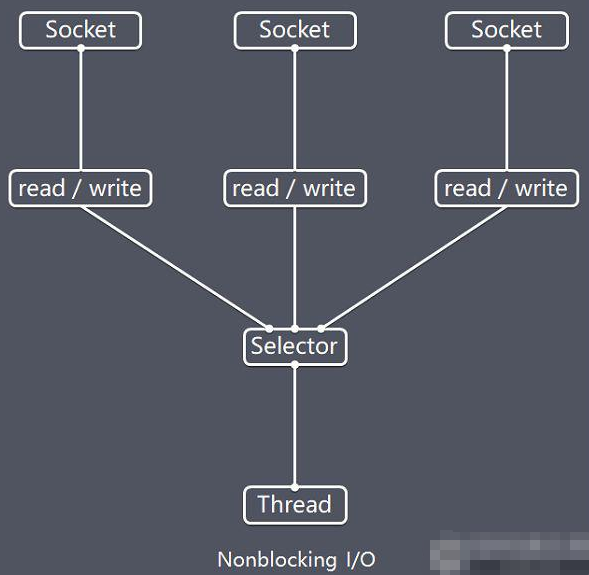
Netty的IO线程NioEventLoop聚合了Selector(选择器,也叫多路复用器),可以同时并发处理成百上千个客户端连接。- 当线程从某客户端
Socket通道进行读写数据时,若没有数据可用时,该线程可以进行其他任务。 - 线程通常将非阻塞
IO的空闲时间用于在其他通道上执行IO操作,所以单独的线程可以管理多个输入和输出通道。 - 由于读写操作都是非阻塞的,这就可以充分提升
IO线程的运行效率,避免由于频繁I/O阻塞导致的线程挂起。 - 一个
I/O线程可以并发处理N个客户端连接和读写操作,这从根本上解决了传统同步阻塞I/O一连接一线程模型,架构的性能、弹性伸缩能力和可靠性都得到了极大的提升。
NIO三大核心原理示意图

Selector、Channel和Buffer的关系说明:
1、 每个channel都会对应一个buffer;
2、 selector对应一个线程,一个线程对应多个channel(连接);
3、 上图反映了有3个channel注册到了该selector;
4、 程序切换到哪个channel,是由事件决定的,Event就是一个重要的概念;
5、 selector会根据不同的事件,在各个通道上切换;
6、 buffer就是一个内存块,底层是有一个数组;
7、 数据的读取写入是通过buffer,这个和BIO是不同的,BIO中要么是输入流,或者是输出流,不能双向,但是NIO的buffer是可以读也可以写,需要flip方法切换;
8、 chennel是双向的,可以反映底层操作系统的情况,比如Linux,底层的操作系统通道就是双向的;
JavaAIO(NIO.2)
异步非阻塞,AIO引入异步通道的概念,采用了Proactor模式,简化了程序编写,有效的请求才启动线程,它的特点是先由操作系统完成后才通知服务端程序启动线程去处理,一般适用于连接数较多且连接时间较长的应用(未得到广泛应用)
群聊系统
服务端
public class GroupChatServer { // 定义属性 private Selector selector; private ServerSocketChannel listenChannel; private static final int PORT = 6667;
// 构造器 // 初始化工作 public GroupChatServer() { try { // 得到选择器 selector = Selector.open(); // ServerSocketChannel listenChannel = ServerSocketChannel.open(); // 绑定端口 listenChannel.socket().bind(new InetSocketAddress(PORT)); // 设置非阻塞模式 listenChannel.configureBlocking(false); // 将该listenChannel 注册到 Selector listenChannel.register(selector, SelectionKey.OP_ACCEPT); } catch (IOException e) { e.printStackTrace(); } }
// 监听 public void listen() { try { // 循环处理 while (true) { //这个方法会阻塞,直到至少有一个通道准备好进行I/O操作(如读、写、连接等)。 //如果有通道准备好,select() 方法会返回准备好的通道数量。 int count = selector.select(); //如果 count 大于 0,说明有通道准备好进行I/O操作。 //代码会遍历 selector.selectedKeys() 返回的 SelectionKey 集合,处理每个 SelectionKey。 if (count > 0) { // 有事件处理 // 遍历得到的selectedkey集合 Iterator<SelectionKey> iterator = selector.selectedKeys().iterator(); while (iterator.hasNext()) { SelectionKey key = iterator.next(); //如果 key.isAcceptable() 为 true,说明有新的连接请求,代码会接受连接并将其注册到 Selector 中。 if (key.isAcceptable()) {// 监听到sccept SocketChannel sc = listenChannel.accept(); sc.configureBlocking(false); // 将该scoketChannel注册到Selector中 sc.register(selector, SelectionKey.OP_READ); // 提示 System.out.println(sc.getRemoteAddress() + " 已上线....."); } //如果 key.isReadable() 为 true,说明通道有数据可读,代码会调用 readData(key) 方法处理读取的数据。 if (key.isReadable()) {// 通道发生read事件,即通道是可读状态 // 处理读 readData(key); } //处理完一个 SelectionKey 后,需要将其从集合中移除,以防止重复处理。 iterator.remove(); } } else { //如果 count 为 0,说明当前没有通道准备好进行I/O操作,代码会输出 "等待中......"。 System.out.println("等待中......"); } } } catch (Exception e) { e.printStackTrace(); } finally {
} }
// 读取客户端消息 private void readData(SelectionKey key) { // 定义一个SocketChannel SocketChannel channel = null; try { // 取得关联的channel channel = (SocketChannel) key.channel(); // 创建buffer ByteBuffer buffer = ByteBuffer.allocate(1024);
int count = channel.read(buffer); // 根据count的值做处理 if (count > 0) { // 把缓冲区的数据转成字符串 String msg = new String(buffer.array()); // 输出该消息 System.out.println("from 客户端: " + msg.trim());
// 向其他的客户端转发消息(排除自己) sendInfoToOtherClients(msg, channel); } } catch (IOException e) { try { System.out.println(channel.getRemoteAddress() + "离线......."); // 取消注册 key.cancel(); // 关闭通道 channel.close(); } catch (IOException ex) { ex.printStackTrace(); } }
} // 转发消息给其他客户(通道) private void sendInfoToOtherClients(String msg, SocketChannel self) throws IOException { System.out.println("服务器转发消息中......."); // 遍历 所有注册到selector 上的SocketChannel,并排除自己 for (SelectionKey key : selector.keys()) { // 通过 key 取出对应的 SocketChannel Channel targetChannel = key.channel(); // 排除自己 if(targetChannel instanceof SocketChannel && targetChannel != self){ // 转型 SocketChannel dest = (SocketChannel)targetChannel; // 将msg 存储到buffer ByteBuffer buffer = ByteBuffer.wrap(msg.getBytes()); // 将buffer数据写入到通道中 dest.write(buffer); } } }
public static void main(String[] args) { // 创建服务器对象 GroupChatServer groupChatServer = new GroupChatServer(); // 监听 groupChatServer.listen(); }}客户端
/** * 客户端代码 */public class GroupChatClient { // 定义相关的属性 // 服务器IP private final String HOST = "127.0.0.1"; // 服务器端口 private final int PORT = 6667; private Selector selector; private SocketChannel socketChannel; private String username;
// 构造器 public GroupChatClient() throws IOException { selector = Selector.open(); // 连接服务器 socketChannel = SocketChannel.open(new InetSocketAddress(HOST, PORT)); // 设置非阻塞 socketChannel.configureBlocking(false); // 将channel 注册到selector socketChannel.register(selector, SelectionKey.OP_READ); // 得到username username = socketChannel.getLocalAddress().toString().substring(1); System.out.println(username + " is ok......"); }
// 向服务器发送消息 public void senInfo(String info) { info = username + " 说:" + info; try { socketChannel.write(ByteBuffer.wrap(info.getBytes())); } catch (IOException e) { e.printStackTrace(); } }
// 读取从服务器端回复的消息 public void readInfo() { try { int readChannel = selector.select(); if (readChannel > 0) {// 即有可以用通道 Set<SelectionKey> selectionKeys = selector.selectedKeys(); Iterator<SelectionKey> iterator = selectionKeys.iterator(); while (iterator.hasNext()) { SelectionKey key = iterator.next(); if (key.isReadable()) { SocketChannel channel = (SocketChannel) key.channel(); // 得到buffer ByteBuffer buffer = ByteBuffer.allocate(1024); // 读取 channel.read(buffer); // 把读到的缓冲区的数据转成字符串 String msg = new String(buffer.array()); System.out.println(msg.trim()); } } // 删除当前的SelectionKey,防止重复操作 iterator.remove(); } else {// System.out.println("没有可用的通道.....");
} } catch (Exception e) { e.printStackTrace(); } } public static void main(String[] args) throws IOException { // 启动客户端 GroupChatClient chatClient = new GroupChatClient();
// 启动一个线程,每隔3秒读取从服务器端发送的数据 new Thread(){ @Override public void run() { while (true){ chatClient.readInfo(); try { Thread.currentThread().sleep(3000); }catch (InterruptedException e){ e.printStackTrace(); } } } }.start();
// 发送数据给服务器端 Scanner scanner = new Scanner(System.in); while (scanner.hasNextLine()){ String str = scanner.next(); chatClient.senInfo(str); }
}}